![Kara Connect - Logo A - RGB - White.png]](https://support.karaconnect.com/hs-fs/hubfs/Kara%20Connect%20-%20Logo%20A%20-%20RGB%20-%20White.png?height=40&name=Kara%20Connect%20-%20Logo%20A%20-%20RGB%20-%20White.png)
What this feature does
When a professional requests additional credits for an employee's sessions, you can now approve or decline that request directly from your manager dashboard. Previously, all credit allocation was handled manually by Kara Connect support. This feature gives you direct control over your organization's wellbeing budget, with faster turnaround for employees.
What you can do
-
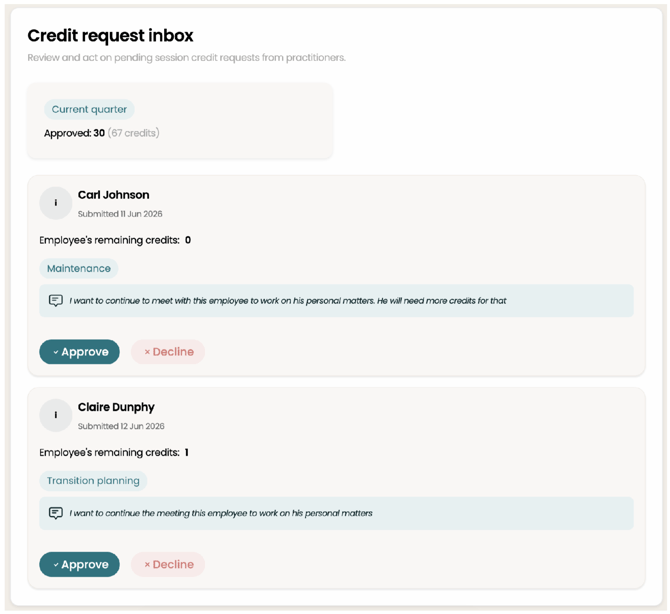
View pending credit requests in your dashboard.
-
Approve or decline a request with one click.
-
View your organization's credit balance and usage.
-
Know that the employee is automatically notified once you approve or decline.
Privacy: what you will and won't see
Credit requests are designed to protect employee confidentiality. As a manager, you'll see that a professional has requested credits for an employee, and how many — not what the sessions are for.
-
No clinical information is visible at any point in the approval flow.
-
You'll see credit usage, not session content or clinical details.
-
Clinical reasoning from the professional about why more credits are needed.
-
Your decision should be based on budget and credit availability, not on the nature of the request.
How to approve or decline a request
-
Log in to your Manager Dashboard.
-
Go to the Credit Requests section.
-
Review the pending request and the number of credits being requested.
-
Select Approve or Decline.
-
The employee and professional requesting the additional credit are automatically notified of the outcome.
Checking your credit balance
Your current credit balance and usage are visible in the dashboard at all times, so you can make informed decisions before approving new requests.
FAQs
Will I see what the sessions are for?
No. You'll only see that credits have been requested and how many. No clinical information is shown.
What happens after I approve or decline?
The employee and professional requesting the additional credits receive an automatic
notification of the outcome. No further action is needed from you.