![Kara Connect - Logo A - RGB - White.png]](https://support.karaconnect.com/hs-fs/hubfs/Kara%20Connect%20-%20Logo%20A%20-%20RGB%20-%20White.png?height=40&name=Kara%20Connect%20-%20Logo%20A%20-%20RGB%20-%20White.png)
Overview
The Wellbeing Profile gives you a high-level picture of what your employees are focusing on across Kara Connect's five support categories.
It is displayed as a spider graph (also called a radar chart), where each axis represents one of the five categories. The shape of the graph grows outward as employee engagement increases in each area.
Key insight
The Wellbeing Profile does not show individual employee data. It reflects aggregated, anonymous engagement across your entire workforce.
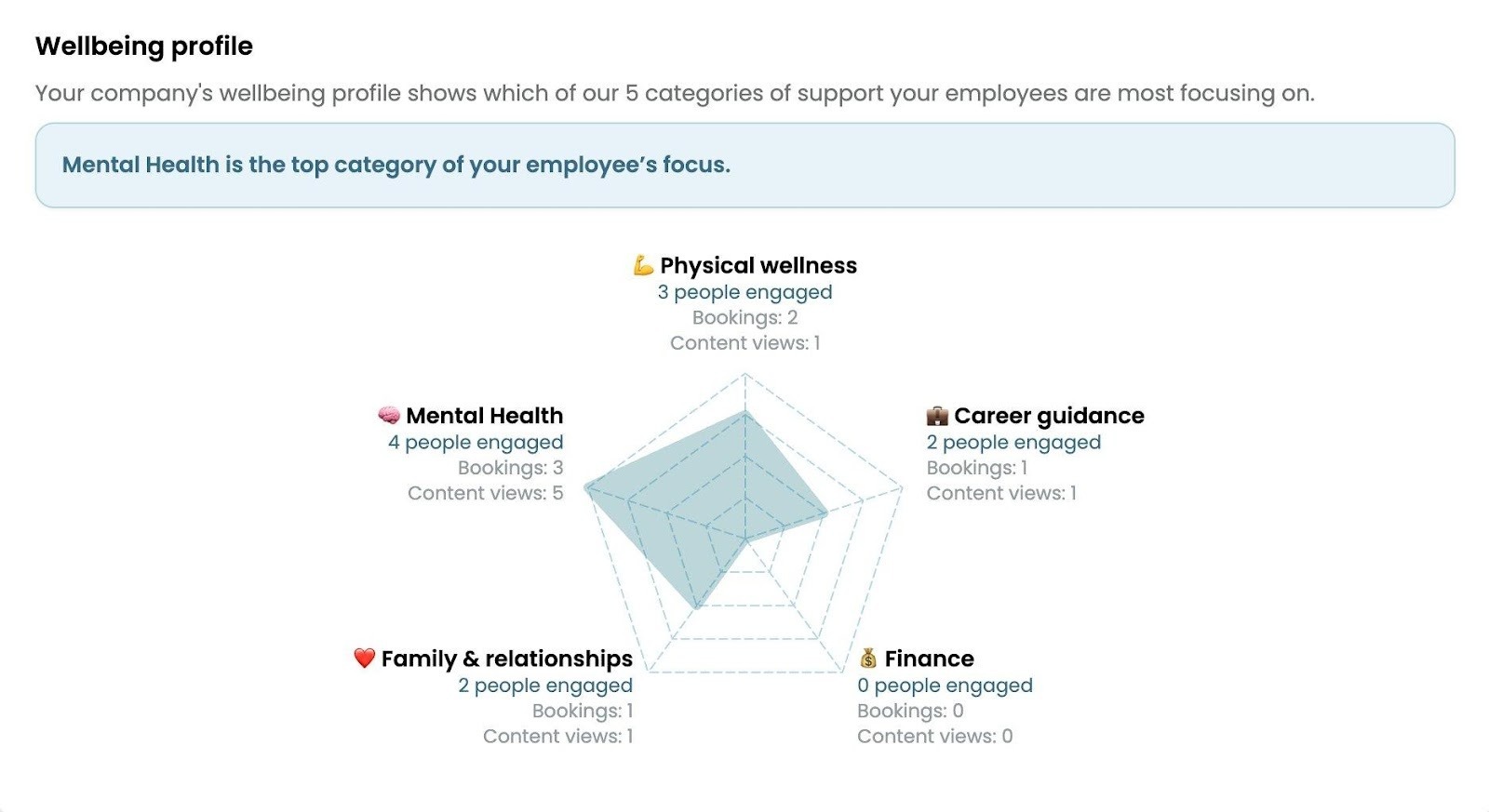
The Wellbeing Profile spider graph as seen in the Managers Dashboard
The Five Categories
Every piece of activity on Kara Connect - whether a session booking or a content view - is linked to one of five wellbeing categories.
These categories are:
|
Category |
Name |
What it covers |
|
💪 |
Physical Wellness |
Exercise, nutrition, sleep, and physical health support |
|
🧠 |
Mental Health |
Stress, anxiety, burnout, therapy, and psychological wellbeing |
|
💼 |
Career Guidance |
Professional development, coaching, and workplace challenges |
|
❤️ |
Family & Relationships |
Parenting, relationships, family dynamics, and social wellbeing |
|
💰 |
Finance |
Financial planning, debt, savings, and money management |
How the Graph is Calculated
The spider graph is driven by two types of employee activity: session bookings and content views.
Each activity contributes to exactly one category, determined by what the employee selected or engaged with.
Session Bookings
When an employee books a session with a professional, they are asked to select a speciality that best describes the reason for their booking.
Each speciality in the platform is mapped to one of the five categories.
This means:
- One booking = one reason selected = one category receives a contribution.
- The selected speciality determines which category moves on the graph.
- If an employee books multiple sessions, each booking contributes independently based on the speciality chosen at that time.
Content Views
Kara Connect also offers a library of wellbeing content (articles, videos, guides, etc.). Each content piece is assigned to one of the five categories.
When an employee views a piece of content:
- One content view = one category contribution.
- The category tied to that content piece is what moves on the graph.
- Multiple views of the same or different content pieces each count as separate contributions.
What the Numbers Mean
Below each category label in the Wellbeing Profile, you will see three data points:
|
Metric |
What it means |
|
People engaged |
The number of unique employees who had at least one booking or content view in this category. |
|
Bookings |
The total number of sessions booked where the employee selected a speciality that maps to this category. |
|
Content views |
The total number of times employees viewed content pieces assigned to this category. |
Reading the Graph
The spider graph is a visual representation of how engagement is distributed across the five categories. The larger the area in a particular direction, the more activity your employees have had in that category relative to others.
A highlighted banner above the graph always shows the top category - the one with the highest combined engagement from bookings and content views.
In the example in the screenshot above, Mental Health is the top category, meaning it received more employee engagement than any other category during the selected period.
|
Tip for HR managers A category with zero activity (such as Finance in the example, with 0 people engaged, 0 bookings, and 0 content views) will show no extension on that axis of the graph. This can indicate either that employees have no current need in that area, or that they are not yet aware of the support available. Consider promoting relevant content or professionals in underrepresented categories. |
Frequently Asked Questions
Does one booking count as one point on the graph?
Yes. Each individual booking contributes once to the category linked to the speciality the employee selected at the time of booking.
Can a single booking affect more than one category?
No. Each booking is linked to a single speciality, which maps to exactly one category. There is no split contribution across categories.
Do content views work the same way?
Yes. Each content view contributes once to the category that the content piece belongs to. If an employee views the same article multiple times, each view is counted.
What is the difference between 'People engaged' and 'Bookings'?
'People engaged' counts unique employees - so if the same employee makes three bookings in Mental Health, they are counted as one person engaged but three bookings. Bookings reflect total volume of activity, while People engaged reflects breadth.
Can I see which specific employees are behind these numbers?
No. The Wellbeing Profile is anonymised and aggregated to protect employee privacy. Individual data is not surfaced in this view.