![Kara Connect - Logo A - RGB - White.png]](https://support.karaconnect.com/hs-fs/hubfs/Kara%20Connect%20-%20Logo%20A%20-%20RGB%20-%20White.png?height=40&name=Kara%20Connect%20-%20Logo%20A%20-%20RGB%20-%20White.png)
💡 Please note: If you’re reading this article, it means a member of the Kara Connect Customer Success Team has confirmed that any sessions paid using credits will be paid by Kara Connect.
There are other available payment types. To learn more about these options, please see here.
💡 Please note: For any payment options outside of Sponsored Credits, it’s the professional’s responsibility to arrange payment directly with their clients.
Kara Connect is not responsible for overdue payments related to sessions that aren’t covered by Sponsored Credits.
To learn more about the difference between Sponsored Credit sessions and Non-Sponsored Credit sessions, please refer to this article.
Wellbeing Hub sessions which are covered by sponsored credits
If you are joining or have joined any of our Wellbeing Hubs, you will have clients whose sessions are covered by what we call Credits. These credits are sponsored by the employers that partner with Kara Connect.
Each employee has a limited number of credits that they can use with professional/s of their choice through their Wellbeing Hub, and each credit equates to one session between a professional and a client.
Clients using Wellbeing Hub credits: When a client books a session using a sponsored credit, please always use the following steps to see if the session was booked using a credit.
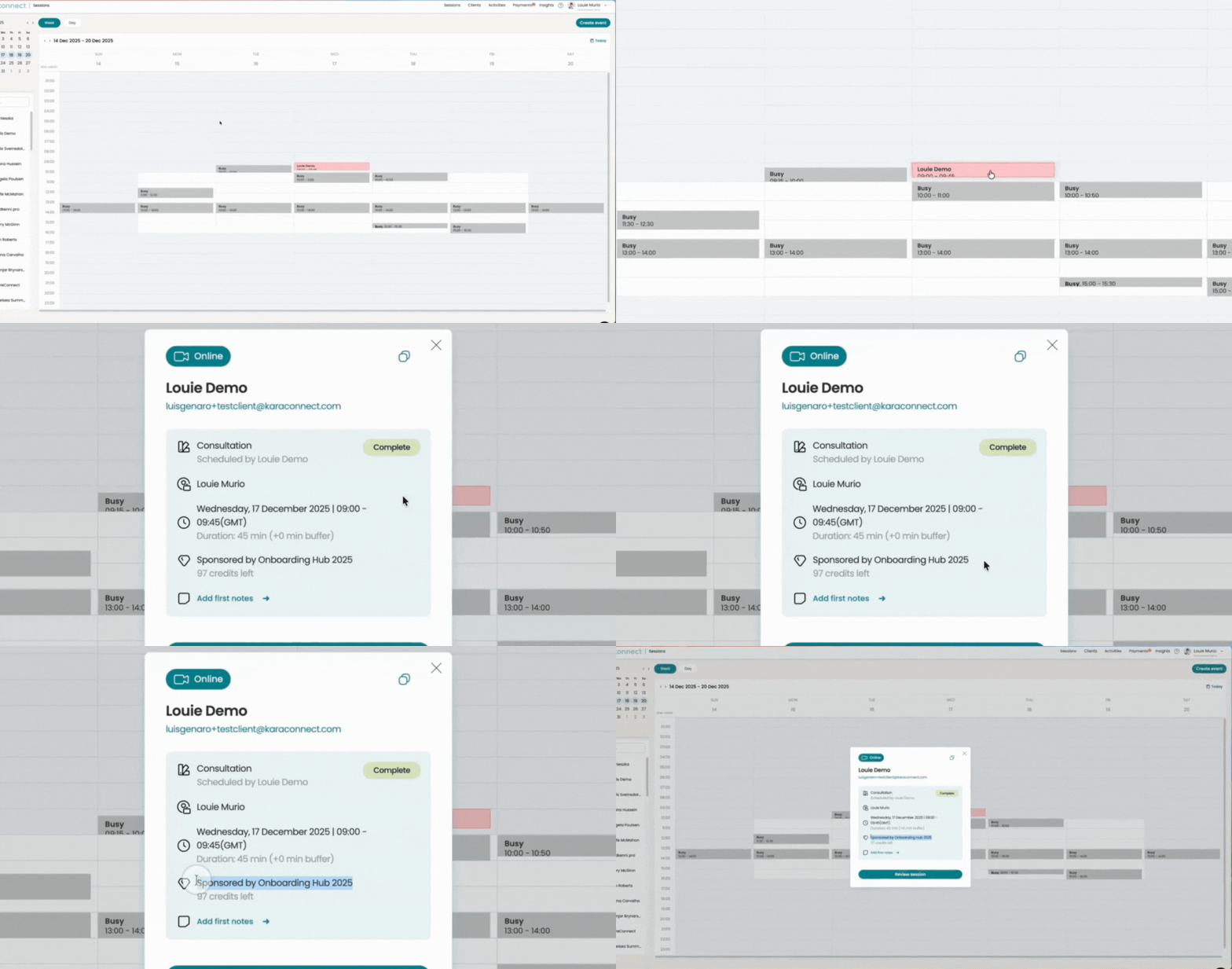
1. Check in the Sessions tab of your account (Best practice - always do this whenever you receive a booking through Kara Connect)
In the Sessions tab (as per the GIF below), you will see that the client's session is covered by a Wellbeing Hub credit.
2. Check after the session has ended
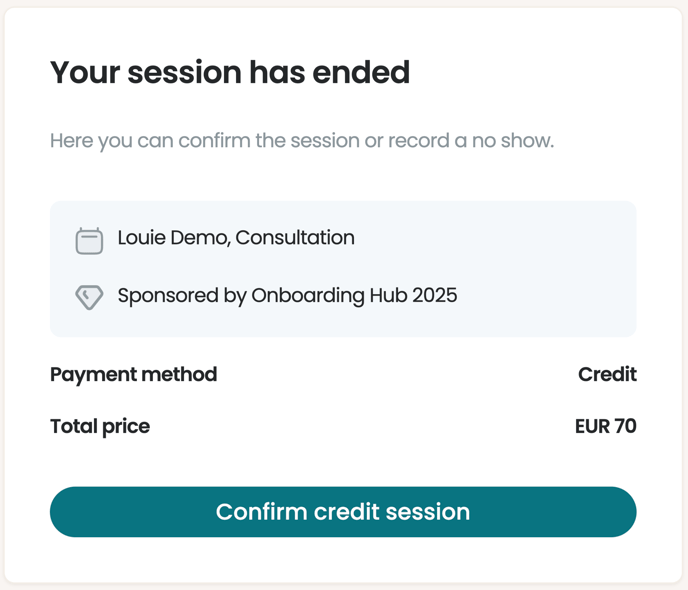
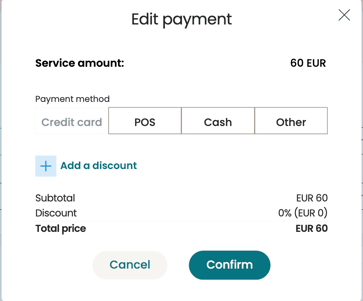
Once the session is finished, you will see the payment summary screen beside the Payment method field; this will say Credit if the session was covered by a sponsored credit.
To complete the payment and mark the invoice as paid, please ensure that you click Confirm credit session.
3. Check the Payments tab in your Kara Connect account
You can confirm whether a session has been paid and covered by a Sponsored Credit by checking the Payments tab and navigating to Unpaid.
To do this:
-
Go to the Payments tab.
-
Click Unpaid.
-
Locate the relevant session and click the three dots on the right-hand side.
-
Select View details to review the payment information.
.gif?width=688&height=343&name=Untitled%20design%20(4).gif)
- If the Sponsor field has the Employer's name beside it, the session was covered by a sponsored Credit.
- If the invoice doesn't have a Sponsor section, then this booking was not covered by a sponsored credit and you need to collect payment directly from the client using other payment methods, details of which can be found here.
Booking covered by a Credit Booking not covered by a Credit
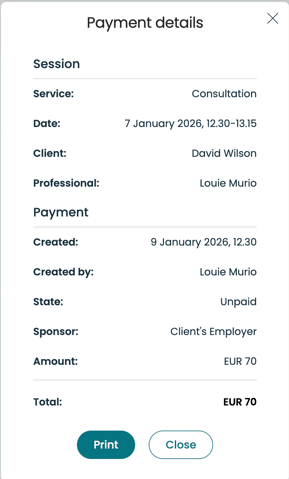
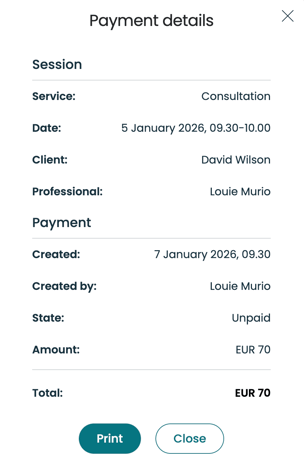
The Sponsor section displays the name of the company which has covered the session with a sponsored credit.
For example: if the Sponsor is "ABC," this indicates that the session was booked through the ABC Wellbeing Hub and was covered by a sponsored credit from ABC.
This means that Kara Connect will handle the payment for this session according to the details outlined in this article ( please see below).
Processing a Payment that is showing as "Unpaid"
In some instances, you may have forgotten to complete the Payment after the session took place.
Please note, that from July 2025, all credit sessions in your calendar will be automatically marked as "Complete" 48 hours after the session is scheduled to end.
Finding the Payment Method for a Paid Session
You can check how a session was paid by reviewing it in the Payments section of your Kara Connect account.
To do this:
-
Go to Payments in your Kara Connect account.
-
Click Paid.
-
Locate the relevant session.
-
Under the session details, you’ll see the payment method, for example Credit
.gif?width=688&height=343&name=Untitled%20design%20(6).gif)
Sending invoices to the Kara Connect accounts department at the end of the month for any completed sessions which are covered by sponsored credits
Please note: If you are part of the Wellbeing Hubs programme through your clinic, then it is your clinic manager's responsibility to send the invoice to Kara Connect.
If you have any questions in this regard, please ask your clinic manager.
For any sessions booked with Credits, where your Kara Connect Customer Success Manager has informed you to invoice Kara Connect, please send the invoices at the end of every month to accounts@karaconnect.com.
If you submit your invoice by the 3rd working day of the following month, payments are scheduled by the 7th working day of the following month.
For example: for all of your sessions in January, please send us the invoice before the 3rd working day of February and we will schedule payment by the 7th working day of February for invoiced sessions which took place between the 1st-31st of January. Please make sure to include the dates of the sessions carried out during this month.
PLEASE NOTE: To send your invoice to the Kara Connect accounts department:
1. Download the exported payments file
2. Create your invoice
Please follow the instructions below to see how to do this.
1. The Exported Payments file
Please export the data into MS excel by doing the following:
(i) In your Kara Connect account, go to Payments and then select Paid.
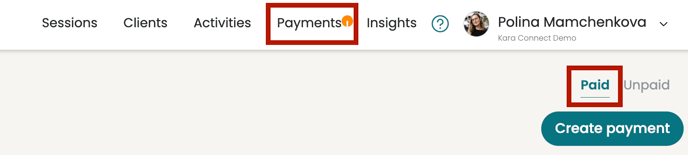
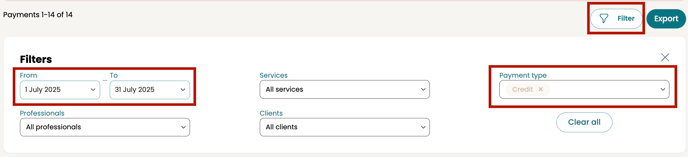
(ii) Filter by the required dates of your invoice
- Make sure to select type Credit.
This will show all sessions on the dates selected where the payment was Credit.
To filter your payments effectively, consider this example:
If it's currently April 2024 and you're preparing an invoice for March, set your filter from the 1st of March to the 31st of March 2024.
This will display all sessions that occurred in March and were covered by a credit.
.gif?width=688&height=371&name=chrome-capture-2025-7-30%20(1).gif)
(iii) Click Export. In the export screen, make sure to select:
- Sponsor
- Transaction date
- Service Name
- Service Price
- Service Currency
- Professional Name and Email
- Type and Sponsor
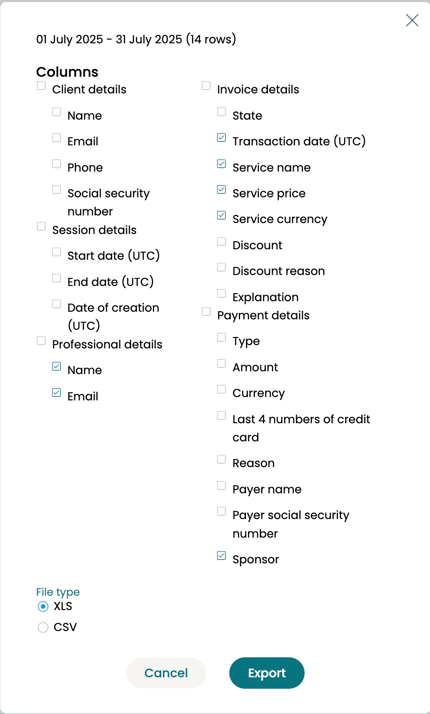
(iv) Click Export. This will download a list of all payments. You can select those marked as Credit.
Please include the total amount of sessions without your clients' names.
For data privacy we DO NOT require your clients names.
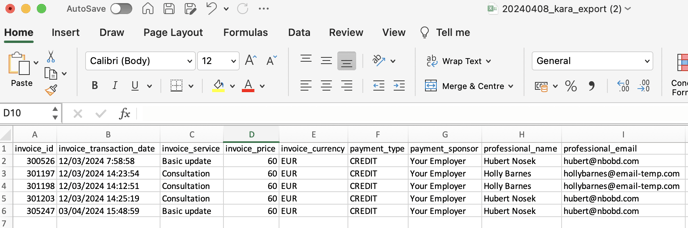
Your Export File will look like this in Excel
Please note that all the services will how Payment Type Credit.
2. Your Invoice
Using the payments file that you have downloaded by following the steps above, please create an invoice.
Please remember to save the invoice as a PDF prior to sending it to accounts@karaconnect.com.
In your invoice, please include:
- Total Cost
- Your email address
- Professional Name (Your name)
- Date and time when the session/s took place
- Your Bank Details.
Please do not share any information about the client (such as client names or emails)
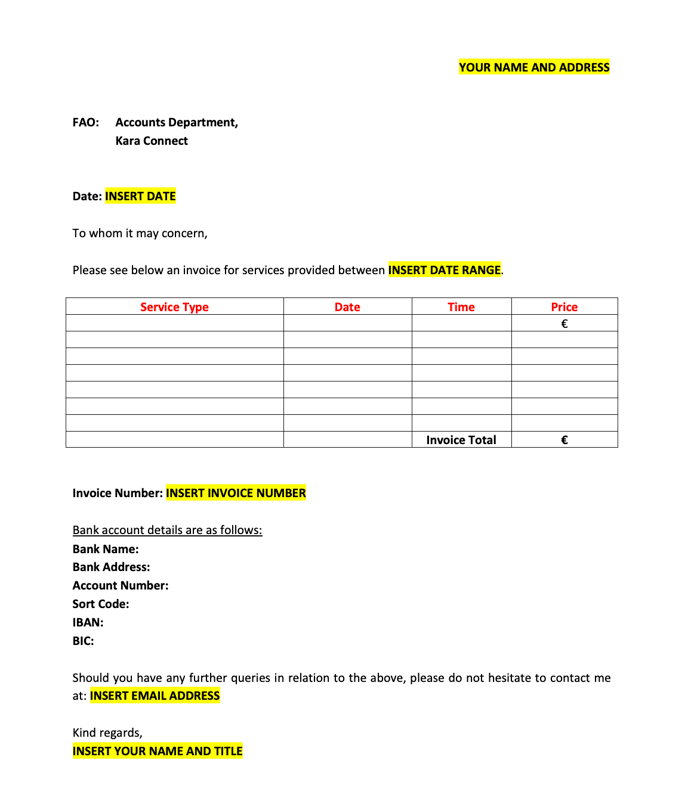
You are welcome to download and amend this template as per your needs.
Please click here to download the template as a MS Word doc.
Note: After you amend the template below as per your needs, please save it as a PDF and send it to accounts@karaconnect.com
Frequently Asked Questions
- Should I send an invoice after every session that I have with a client?
No, please do not send individual invoices. You only need to send one invoice per month that includes all completed sessions for that period (e.g., August 1st–31st).
- I have emailed the accounts department but not received a response yet. Should I be worried?
Not at all. Our team processes a high volume of payments at the end of the month, so it may take 2–3 working days to receive a response. We are working hard to get back to you!
Need an urgent answer? Contact our Customer Success team via the black chat bubble (bottom-right) or email support@karaconnect.com.
- Why have I not received payment yet?
Our payment schedule is based on business working days, not calendar days. Please check the following timelines:
-
-
If you submitted by the 3rd working day: Payment is scheduled by the 7th working day of the month.
-
If you submitted late (after the 3rd): Please allow a minimum of 7 working days from the date of submission for processing.
-
Still waiting? If the 7th working day has passed and you have not received your funds, please contact us immediately so we can investigate.
- What if the session was not charged by sponsored credits? How can I charge for these sessions.
If any sessions from our Wellbeing Hubs programme are conducted without credits, it is your responsibility to arrange payment options with your client. To learn more about how to process payments, please click here.
Kara Connect VAT Number
If you require our VAT number you can find it here:
Ireland:
VAT: 4119058IH
Address: Kara Connect Ireland Limited, Huckletree, The Academy, 42 Pearse St, Dublin, D02 HV59, Ireland
Iceland:
SSN: 640614-0210
VAT: 129644
Address: Skipholt 25, 105 Reykjavík, Iceland